




Facebook really loves to play Popularity Police. If you don’t like enough of a Page’s posts, they stop showing in […]
Deleting Blank Pages in LibreOffice and OpenOffice
May 11th, 2011
The word processors of both LibreOffice and OpenOffice free open-source office suites have an annoying habit of inserting blank pages in documents. These insidious pages won’t show until you go to print the document.
Libre- and OpenOffice do this because of their insistence upon interpreting every document as a “book”, with left and right pages. If you fiddle with the page numbering or page breaks, you may find yourself with blank pages inserted to “help” you keep your “book”‘s odd/even pages properly lined up.
Mostly what I print from word processors are contracts, memos, faxes, and letters, so the whole book format doesn’t matter to me and the blank pages are basically just a royal pain. After finagling around a bit trying to find out how to remove these blank pages based on where and how I add breaks and page numbering, I discovered the easy solution.
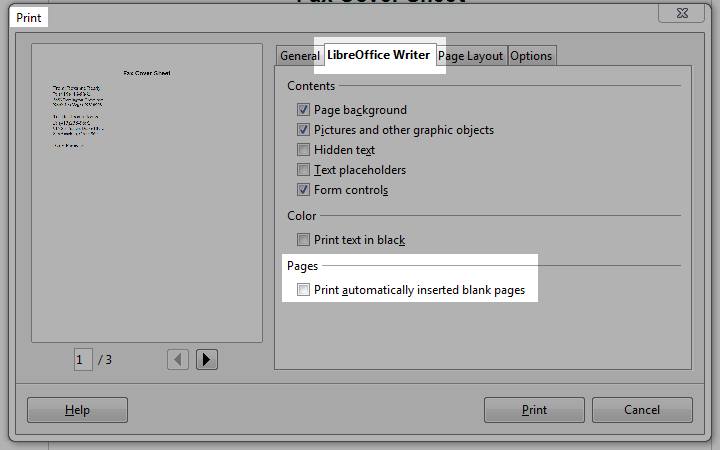
When you go to print your OpenOffice or LibreOffice document, go to the Open-/LibreOffice Writer tab and un-check the box to “print automatically inserted blank pages”. Done. You’ll see the page numbers below the preview on the left decrease accordingly.


This was VERY helpful, THANKS!
I have another quiry: how do you simply DELETE a page or doc?? I keep getting a 2nd pg. when trying to make charts for school etc. & it keeps giving me a 2nd page, I can avoid the printing, but how can I just delete the page?? And I replaced a doc with an updated version, but I can’t left click delete, or send to trash etc. there seems to be no way to remove the doc at all?
Forgive my ignorance, I’m new to Ubuntu : )
THANKS!
I’m glad I could help you out! To be honest, I don’t know the answer to your other questions, though. :( I’ve never had either issue (and I’m working on a Windows machine). Best of luck!
You can click on the bottom of the page you want to save….you will notice the dotted lines appear and the blue “footer” popup and you will know you are at the very bottom of the page you want to keep…Now, to delete all the extra pages after that point > don’t just click on your delete button… you must click it and hold it down for a moment and you will see all the pages after where you have your cursor placed disappear. I hope this helped :)
This is great to know. This is one of the most annoying issues I have with LibreOffice. I remember Word used to do the same thing back in the day.
repustech´s last blog post ..Review: Audacity and Lame, Open Source Greatness
Thanks for the info, it’s helpful, but the title is misleading. Something on the lines of ”Preventing LibreOffice and the likes from printing blank pages” would have been more accurate, and more in line with the google query that landed me here (http://www.google.ro/search?q=libreoffice+delete+blank+page).
Anyway, love the wordpress theme. Brings back a lot of Sinclair Spectrum memories…
Try this in Open Office to get rid of blank pages added automatically at the end of text documents. Place the cursor on the next line after the end of your text.Type any letter, hit next line (usually your large enter key) and repeat these actions until you get to the end of the blank page. Then select and highlight this new nonsense. Press delete.
Remy you are the BEST!!!! Your technique worked great.
You can unset this preference permanently by modifying the LibreOffice options: Tools > Options > LibreOffice Writer > Print > (Other) Print automatically inserted blank pages.
Some of us who don’t write books find this procedure helpful.
oh my god, thank you so much. I fucked up my boyfriend’s resume somehow… I was able to simply print the page we needed as a PDF but Open Office still saved the document as two pages, one being blank. All the other solutions I found were of the “delete all the empty space” variety, which wasn’t helpful since there wasn’t any empty space. Anyway, this worked like a charm and now I don’t have to Hulk Smash Open Office.
brooke´s last blog post ..omgwant:
Gimme gimme gimme.
Because I am too damned lazy to…
When I originally commented I appear to have clicked on the -Notify me when new comments are added- checkbox and from now on every time a comment is added I receive four emails with the exact same comment.
Is there a means you can remove me from that service?
Thank you!
When I look at my database, it shows your email as not subscribed. Did you use a different email address when you initially subscribed?
There should be an “unsubscribe” link at the bottom of each email you receive. You should also be able to manage your subscriptions by visiting the article you originally subscribed to.
Unfortunately Print Preview then doesn’t work properly.
Do any of the writers of this stupid program actually use it?
Hi, I have just discovered a very simply method to delete blank pages. Move the mouse pointer to the very end of the page brake line on the LHS (it might work on the RHS as well) until a little arrow appears. Click on the arrow and a box appears with delete page in it. Click – Simple when you know how.
Folks , just use CTRL+F9 in liberoffice docs to remove unwanted blank pages… !!!